Hello Everyone!! I'm Sejal Marawade. This blog series is all about the basic concepts of linux operating system. As today I attended my first ever workshop organised by Mr. Pranav Jambare (DevOps Engineer , Tcs )
These are the concepts were been taught at day-1 (10th July,2023) of the workshop.
Table of contents
Operating System:
Introducing linux :
Evolution:
Benefits :
Architecture of linux:
Yaking , Redirection & modes:
Operating System:
• Operating system is the interface between computer and hardware.
• Operating system is software that directly manages a system's hardware & resources like CPU, memory, storage .
•E.g. Windows, Fedora, Mac, Ubuntu, Redhat, Suse, etc.
Introducing linux :
Linux is an open-source operating system. It is created in the early 1990s by Linus Torvalds.The full form of LINUX is Lovable Intellect Not Using XP. Linux is an open-source operating system for servers, computers, mainframes, mobile systems, and embedded systems. Ubuntu, Fedora, Debian, openSUSE, and Red Hat are some examples of linux.
Evolution :
•1969 -: Unix developed by AT & T
• 1973 -: Unix written in C
• 1974 -: Unix released for educational purpose
• 1975 - 1979 -: 6th and 7th edition
• 1983 -: System V accepted as standard OS
• 1987 -: SCO reported record distribution of Xenix
• 1990 -: UnixWare developed
• 1993 -: Berkeley stopped further Unix development
• 1996 -: Over 20+ distribution
In the year 1991, Linus Torvalds invented Linux.
Benifits of linux :
• Free.
• 0pensource.
• Secure.
• Low level resources support.
• Customization.
• Privacy.
• Perfect for programmers.
• Updates.
• Variety of distribution.
• Better community support.
Architecture of linux :
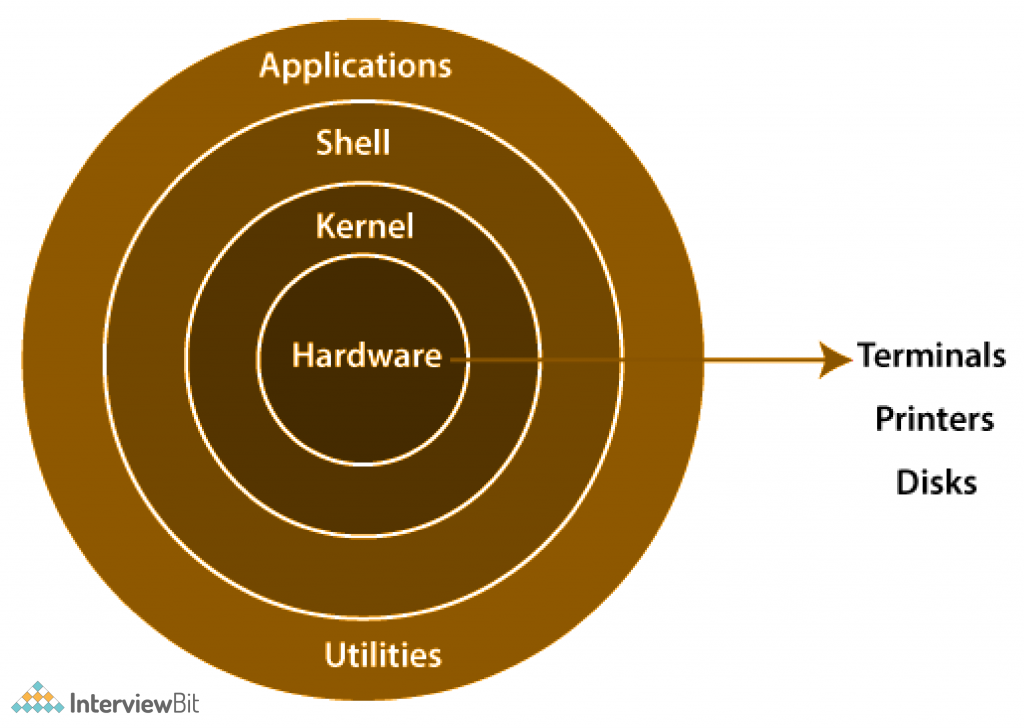
The diagram illustrates the structure of the Linux system, according to the layers concept.
Shell : It is a terminal used to run command.
Kernel : It is the interpreter for communication of shell and hardware. If it gets crashed, complete OS gets crashed.
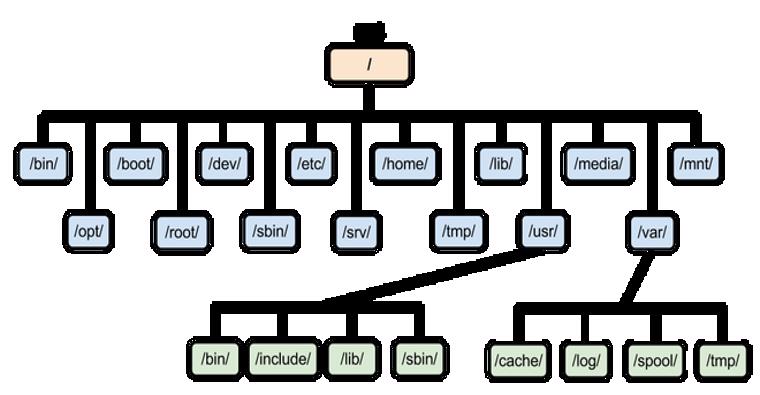
Hierarchy of Linux file :
Yaking:
It typically refers to the activities like copy, past, delete, etc. which takes place in the terminal, it can be done with certain commands.
Here are some commands.
/<word> - To search a word.
Note : To find next word press 'n'.
yy - Copy.
P - paste
dd - Cut or delete
cc - Going on insert mode
gg - Beginning of the file from present line.
G - Go to last line
:<line_number> - Going to any specific line number.
:set nu - To display line number.
:!<command> - To run command in a file.
:%s/xyz/abc/g - To replace all xyz present with abc.
:wq! - To save and quit.
Redirection:
Redirection allows you to redirect input and output of commands, whether you want to store the error into the error file or want to display it.
1. Find / -user <username>
2. Find / -user <username> 2> <errorfile>
3. Find / -user <username> > <o/p file>
4. Find / -user <username> > <o/p file> 2> <errorfile>
5. Find / -user <username> &> /dev/
Modes :
•Insert mode
•Save and exit
•Visual / Block
•Escape mode
This topics were covered in this session.
Thank you for reading my blog.